> ## Documentation Index
> Fetch the complete documentation index at: https://geonode.mintlify.site/llms.txt
> Use this file to discover all available pages before exploring further.
# Verify Proxy Connection
> How to Verify a Proxy Connection
***
You can verify your proxy connection using two methods:
* **Using an online tool**
* **Using the command line (cURL)**
***
## **Method 1: Using an Online Tool**
### **Step 1: Check Your Current IP Address**
Before enabling your proxy, check your current IP address:
1. Go to **[IP API](https://ip-api.com/)**.
2. Note down your IP address for reference.
### **Step 2: Connect to Your Proxy**
Set up and configure your proxy based on your device or browser. Follow these setup guides based on your platform:
* **[Windows 10/11](/proxy-setup/desktop-os/windows)**
* **[macOS](/proxy-setup/desktop-os/macOS)**
* **[Android](/proxy-setup/mobile-os/android)**
* **[iOS](/proxy-setup/mobile-os/ios)**
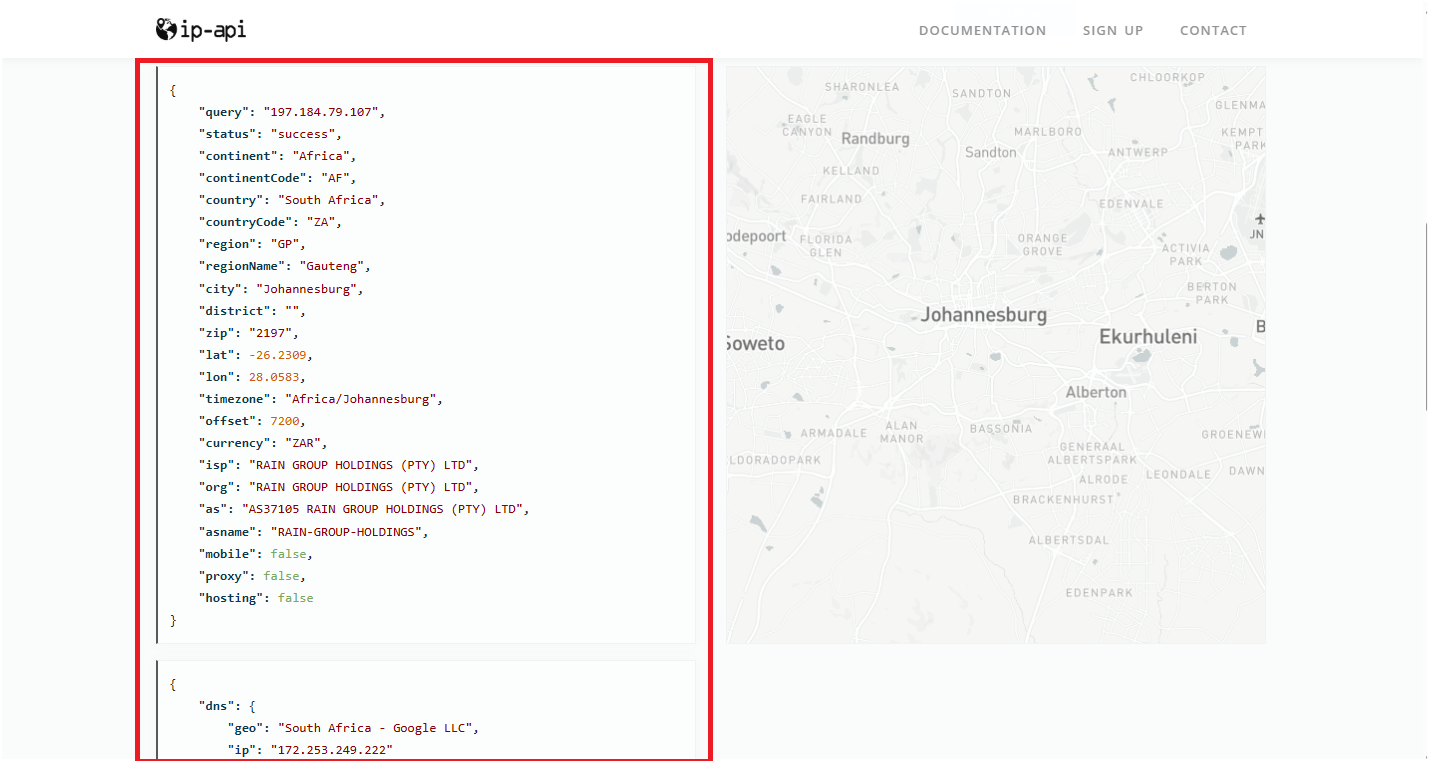
### **Step 3: Verify Your New IP Address**
After connecting to your proxy:
1. Go to **[IP API](https://ip-api.com/)**.
2. Check if the displayed IP matches the proxy location you configured.
3. If the IP has changed, your proxy is working correctly.
 ***
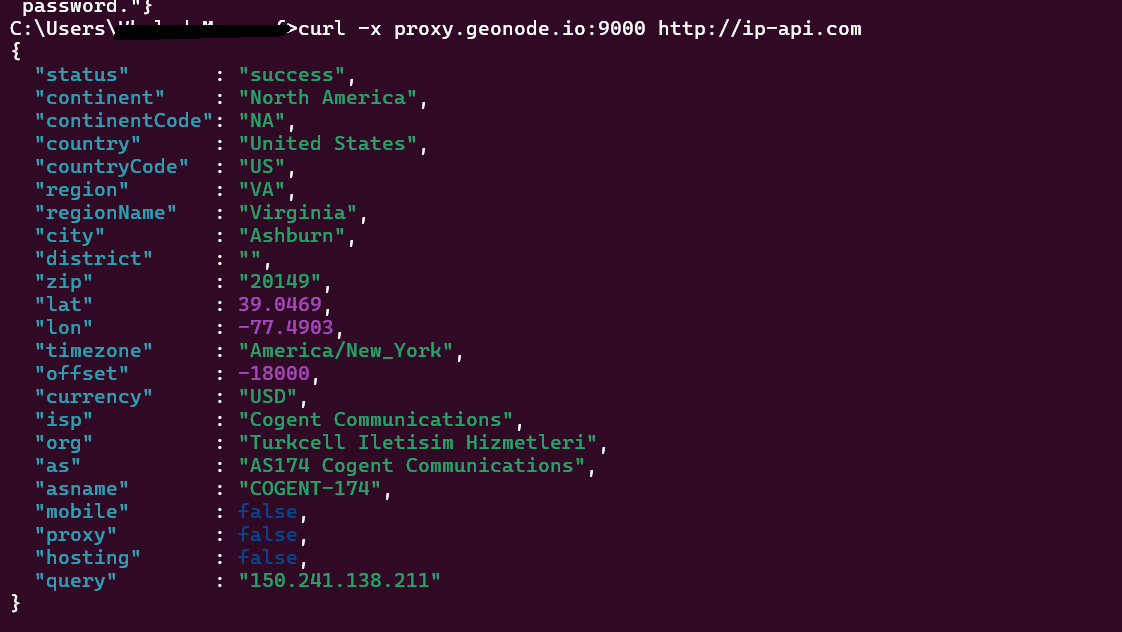
## **Method 2: Using the Command Line (cURL)**
To verify your proxy connection via the command line, use the following command:
```sh theme={null}
curl -x proxy.geonode.io:9000 http://ip-api.com
```
If your proxy is working, the response should show a new IP address instead of your original one.
***
## **Method 2: Using the Command Line (cURL)**
To verify your proxy connection via the command line, use the following command:
```sh theme={null}
curl -x proxy.geonode.io:9000 http://ip-api.com
```
If your proxy is working, the response should show a new IP address instead of your original one.
 ***
If you encounter any issues, refer to the [**troubleshooting section**](/knowledge-base/troubleshooting/proxy-not-working) or [**Geonode support**](/additional-resources/support).
***
## **FAQs**
If your connection fails, check the following:
* Ensure that your proxy credentials (IP, Port, Username, Password) are correct.
* Verify that your proxy is active in the Geonode Dashboard.
* Try another proxy format if the selected one isn't working.
* Refer to this guide for troubleshooting: [Troubleshooting Proxy Connection Issues](/knowledge-base/troubleshooting/pages-not-loading)
* You may be using a Sticky Session proxy that keeps the same IP for a certain duration.
* If using a Rotating Session, verify that your requests are being routed through the proxy correctly.
* Check your connection using an IP verification tool: [Verify Proxy Connection](https://ip-api.com/)
* Some websites detect **frequent IP changes** and show CAPTCHAs as a security measure.
* Use Sticky Sessions if you need a stable connection.
* Try switching to a mobile or residential proxy for lower detection rates.
* High latency can occur if the proxy server is far from your location.
* Try using a different proxy region to improve speed.
* Reduce the number of simultaneous requests to avoid overloading the proxy.
* This can happen if the proxy authentication credentials are not correctly stored or passed by your browser or application. Ensure that the correct username and password are saved in your proxy settings.
* Or you can whitelist your IP. Refer to this guide for [How to Whitelist an IP](/proxy-setup/advance-configuration/whitelist-ip)
***
If you encounter any issues, refer to the [**troubleshooting section**](/knowledge-base/troubleshooting/proxy-not-working) or [**Geonode support**](/additional-resources/support).
***
## **FAQs**
If your connection fails, check the following:
* Ensure that your proxy credentials (IP, Port, Username, Password) are correct.
* Verify that your proxy is active in the Geonode Dashboard.
* Try another proxy format if the selected one isn't working.
* Refer to this guide for troubleshooting: [Troubleshooting Proxy Connection Issues](/knowledge-base/troubleshooting/pages-not-loading)
* You may be using a Sticky Session proxy that keeps the same IP for a certain duration.
* If using a Rotating Session, verify that your requests are being routed through the proxy correctly.
* Check your connection using an IP verification tool: [Verify Proxy Connection](https://ip-api.com/)
* Some websites detect **frequent IP changes** and show CAPTCHAs as a security measure.
* Use Sticky Sessions if you need a stable connection.
* Try switching to a mobile or residential proxy for lower detection rates.
* High latency can occur if the proxy server is far from your location.
* Try using a different proxy region to improve speed.
* Reduce the number of simultaneous requests to avoid overloading the proxy.
* This can happen if the proxy authentication credentials are not correctly stored or passed by your browser or application. Ensure that the correct username and password are saved in your proxy settings.
* Or you can whitelist your IP. Refer to this guide for [How to Whitelist an IP](/proxy-setup/advance-configuration/whitelist-ip)