> ## Documentation Index
> Fetch the complete documentation index at: https://geonode.mintlify.site/llms.txt
> Use this file to discover all available pages before exploring further.
# Proxy Authorization in API Using Headers
> How to authenticate Geonode proxy API requests using headers.
***
API authorization is essential for secure access to Geonode's proxy services.
This guide explains how to authenticate API requests using **Authorization** with the `Authorization` header.
## **Get your users credentails**
Before setting up a authenticatation, you need your user credentails details.
* Follow this guide: [How to access your Geonode API credentials](/proxy-setup/prerequisites/access-credentials)
## **Generating the Authorization Header**
Geonode's API requires your username and password to be Base64-encoded to form the Authorization header.
* Go to the API documentation for the specific endpoint you wish to use (e.g., Retrieve Usage Statistics).
* Click the Try it button on the API documentation page.
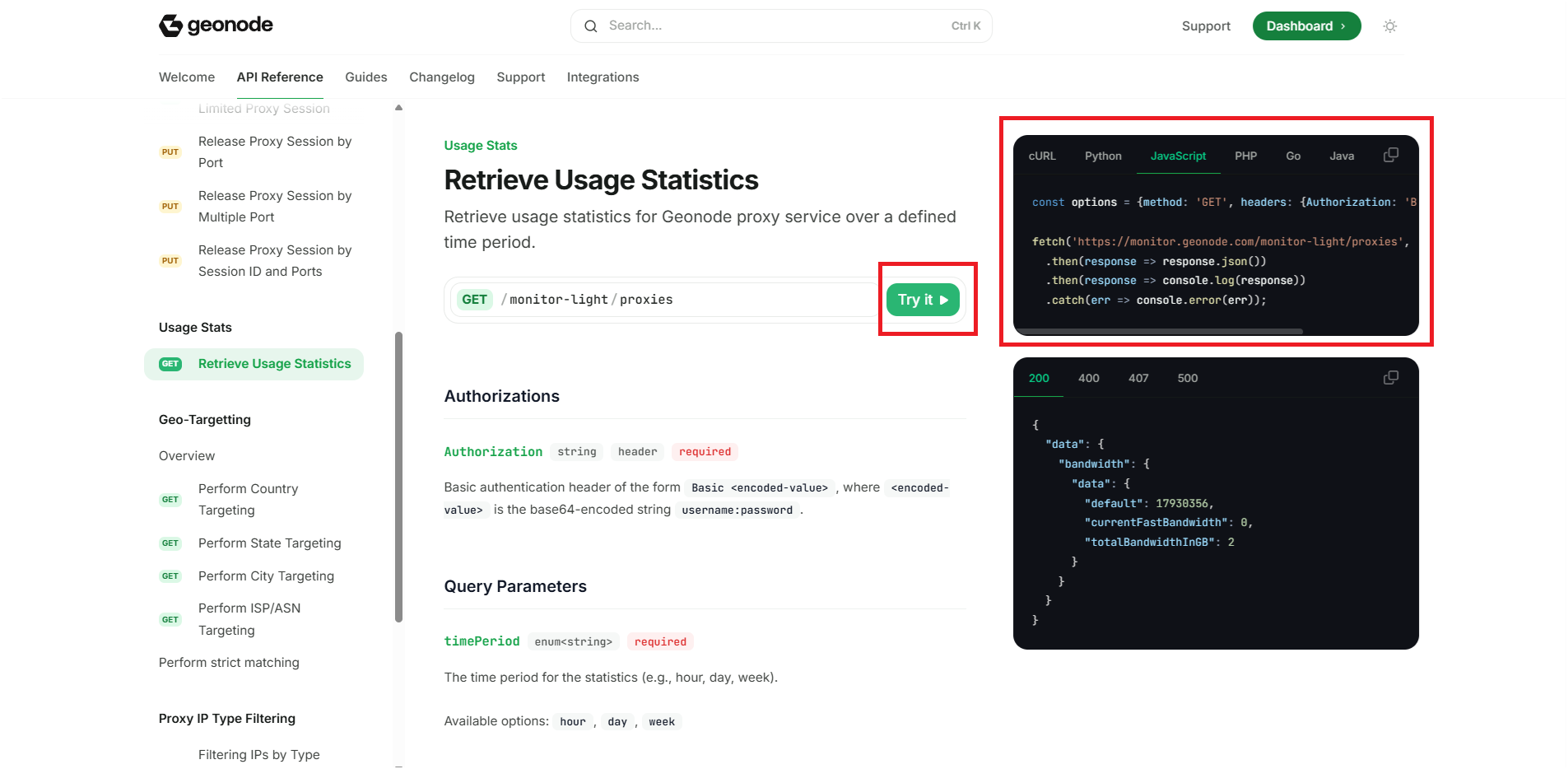 * A popup will open asking for your username and password. Enter these details.
* The system will automatically generate the Authorization header for you with the Base64-encoded string.
* A popup will open asking for your username and password. Enter these details.
* The system will automatically generate the Authorization header for you with the Base64-encoded string.
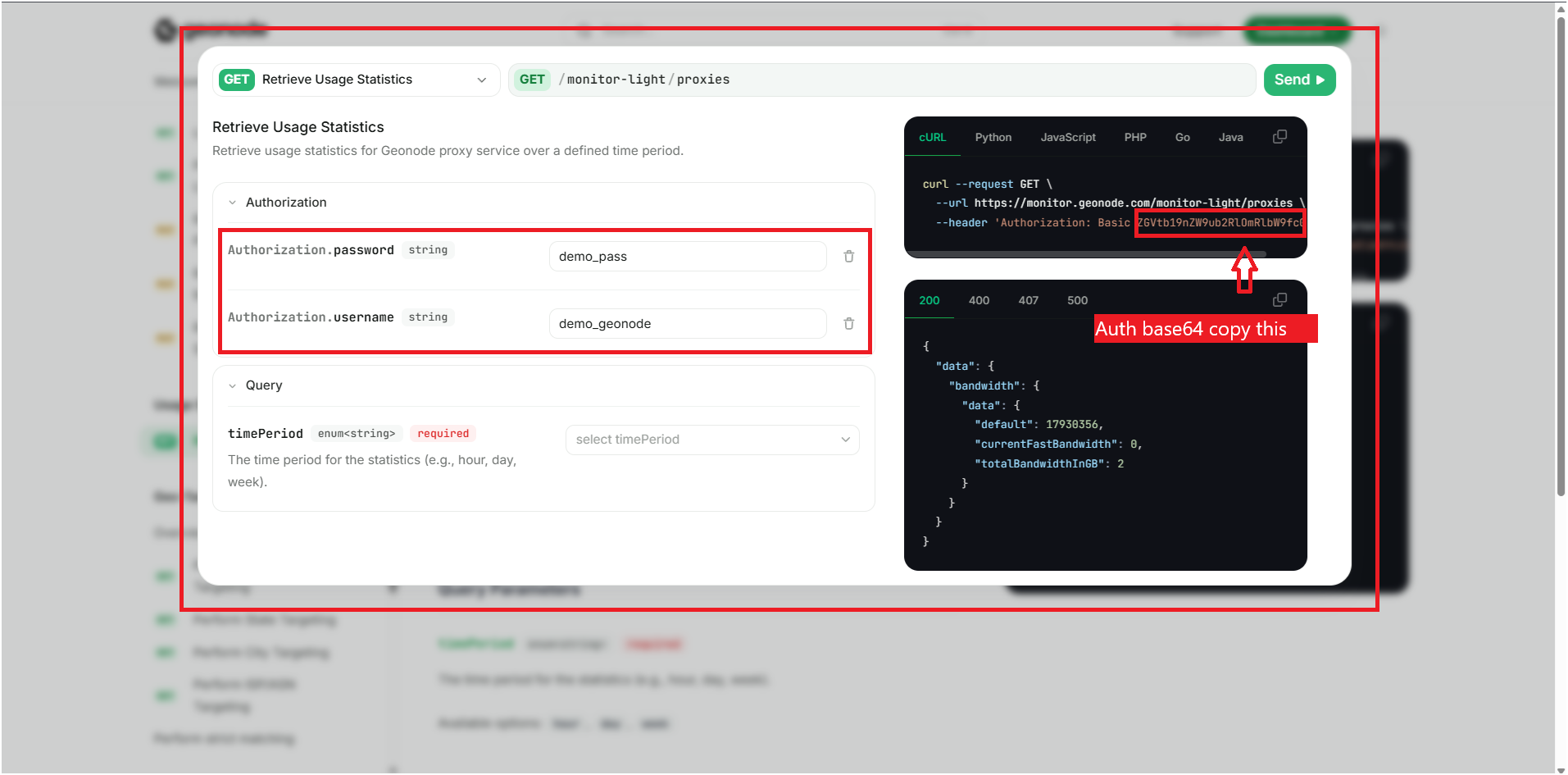 * Copy the generated Authorization header or the Base64-encoded string. You can either use the generated header directly or copy the Base64 value for use in your code.
## **Best Practices for Secure Authorization**
* **Generate the Token Once:** Generate your authorization token once and reuse it.
* **Store Securely:** Save the token in an environment file (`.env`) for better security.
* **Avoid Hardcoding:** Never hardcode tokens directly into your codebase.
* **Use HTTPS:** Always make API calls over HTTPS to protect sensitive information.
* **Rotate Credentials Regularly:** Update your credentials periodically to enhance security. Keep in mind, updating credentials means updating the token. You will need to generate a new token whenever new credentials are created.
## **Troubleshooting Tips**
* Ensure that your `Authorization` header is formatted correctly and includes a properly Base64-encoded username and password. Also, verify that your credentials are correct.
* Ensure that you are encoding `username:password` exactly as specified, without any extra spaces or characters.
* Make sure you are using HTTPS in your API requests. If you are behind a corporate firewall, check if SSL interception is interfering.
* Use a tool like **Postman** or **cURL** to send test requests and verify if authorization is working.
* Immediately change your password, regenerate your API credentials, and update your token in your code.
If you encounter any issues, refer to the [**troubleshooting section**](/knowledge-base/troubleshooting/proxy-not-working) or [**Geonode support**](/additional-resources/support).
## **FAQs**
No, Geonode's API documentation provides a tool to generate the Base64-encoded string automatically.
Currently, Basic Authorization with the `Authorization` header is required to access Geonode's proxy API.
At the moment, Geonode primarily supports Basic Authorization. Check the latest API updates for any additional authorization methods.
No, Base64 encoding is not encryption. It simply encodes the credentials. Always use HTTPS to ensure security.
It's recommended to update your credentials periodically, especially if you suspect any compromise.
* Copy the generated Authorization header or the Base64-encoded string. You can either use the generated header directly or copy the Base64 value for use in your code.
## **Best Practices for Secure Authorization**
* **Generate the Token Once:** Generate your authorization token once and reuse it.
* **Store Securely:** Save the token in an environment file (`.env`) for better security.
* **Avoid Hardcoding:** Never hardcode tokens directly into your codebase.
* **Use HTTPS:** Always make API calls over HTTPS to protect sensitive information.
* **Rotate Credentials Regularly:** Update your credentials periodically to enhance security. Keep in mind, updating credentials means updating the token. You will need to generate a new token whenever new credentials are created.
## **Troubleshooting Tips**
* Ensure that your `Authorization` header is formatted correctly and includes a properly Base64-encoded username and password. Also, verify that your credentials are correct.
* Ensure that you are encoding `username:password` exactly as specified, without any extra spaces or characters.
* Make sure you are using HTTPS in your API requests. If you are behind a corporate firewall, check if SSL interception is interfering.
* Use a tool like **Postman** or **cURL** to send test requests and verify if authorization is working.
* Immediately change your password, regenerate your API credentials, and update your token in your code.
If you encounter any issues, refer to the [**troubleshooting section**](/knowledge-base/troubleshooting/proxy-not-working) or [**Geonode support**](/additional-resources/support).
## **FAQs**
No, Geonode's API documentation provides a tool to generate the Base64-encoded string automatically.
Currently, Basic Authorization with the `Authorization` header is required to access Geonode's proxy API.
At the moment, Geonode primarily supports Basic Authorization. Check the latest API updates for any additional authorization methods.
No, Base64 encoding is not encryption. It simply encodes the credentials. Always use HTTPS to ensure security.
It's recommended to update your credentials periodically, especially if you suspect any compromise.