> ## Documentation Index
> Fetch the complete documentation index at: https://geonode.mintlify.site/llms.txt
> Use this file to discover all available pages before exploring further.
# Quick Start Guide
> Follow our step-by-step quick guide to setup your proxy
***
Welcome to Geonode! This guide is designed to provide a comprehensive overview to help you quickly set up your Geonode proxy.
***
## Comprehensive Steps to Activate and Configure Your Geonode Proxy
By following these simple steps, you'll be ready to use your Geonode proxy in no time.
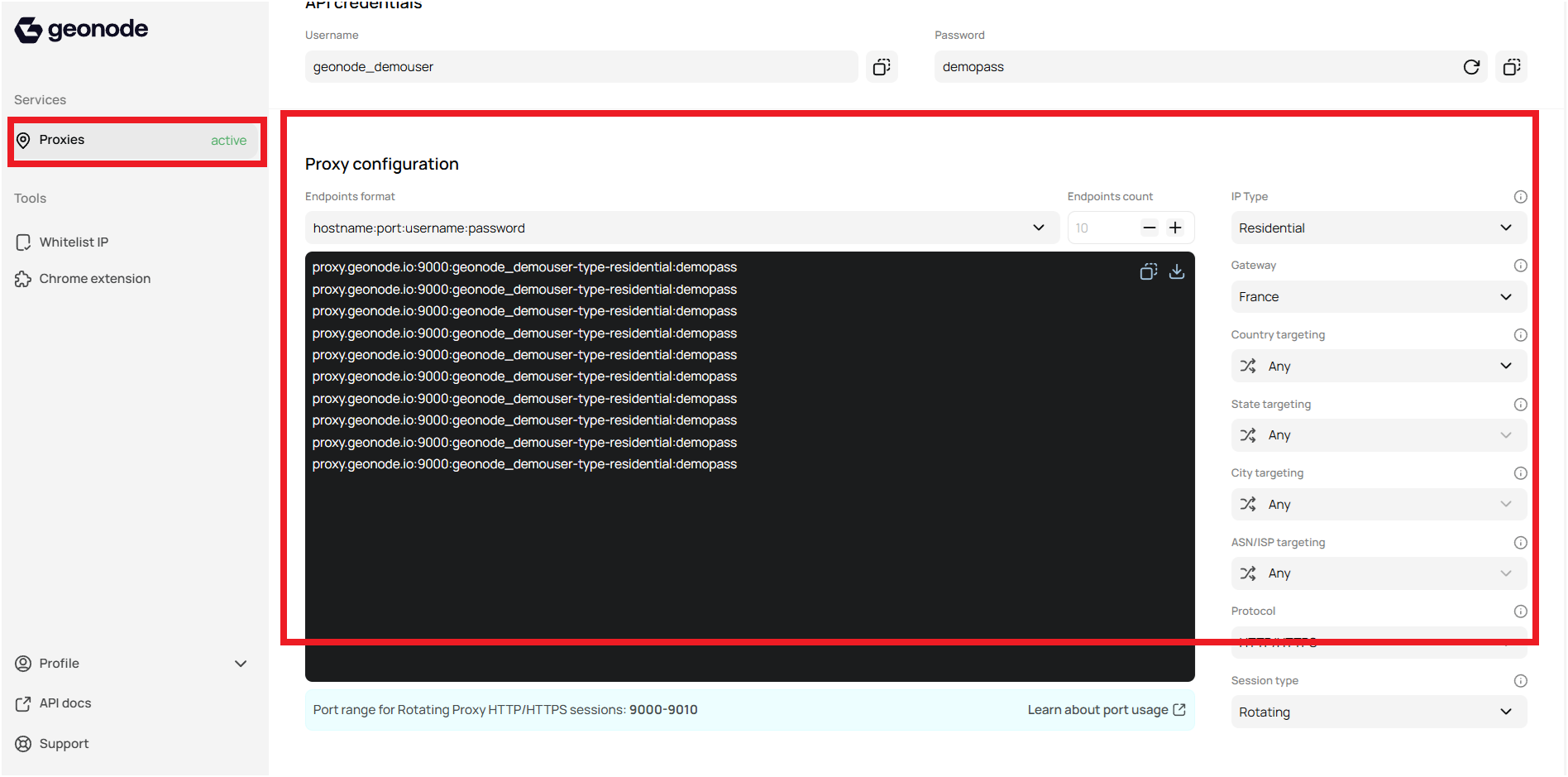
### Step 1: Accessing the User Dashboard
Begin by accessing your user dashboard where you can manage all your proxy settings.
* Navigate to the dashboard.
* Scroll down to **Proxy Configuration**.
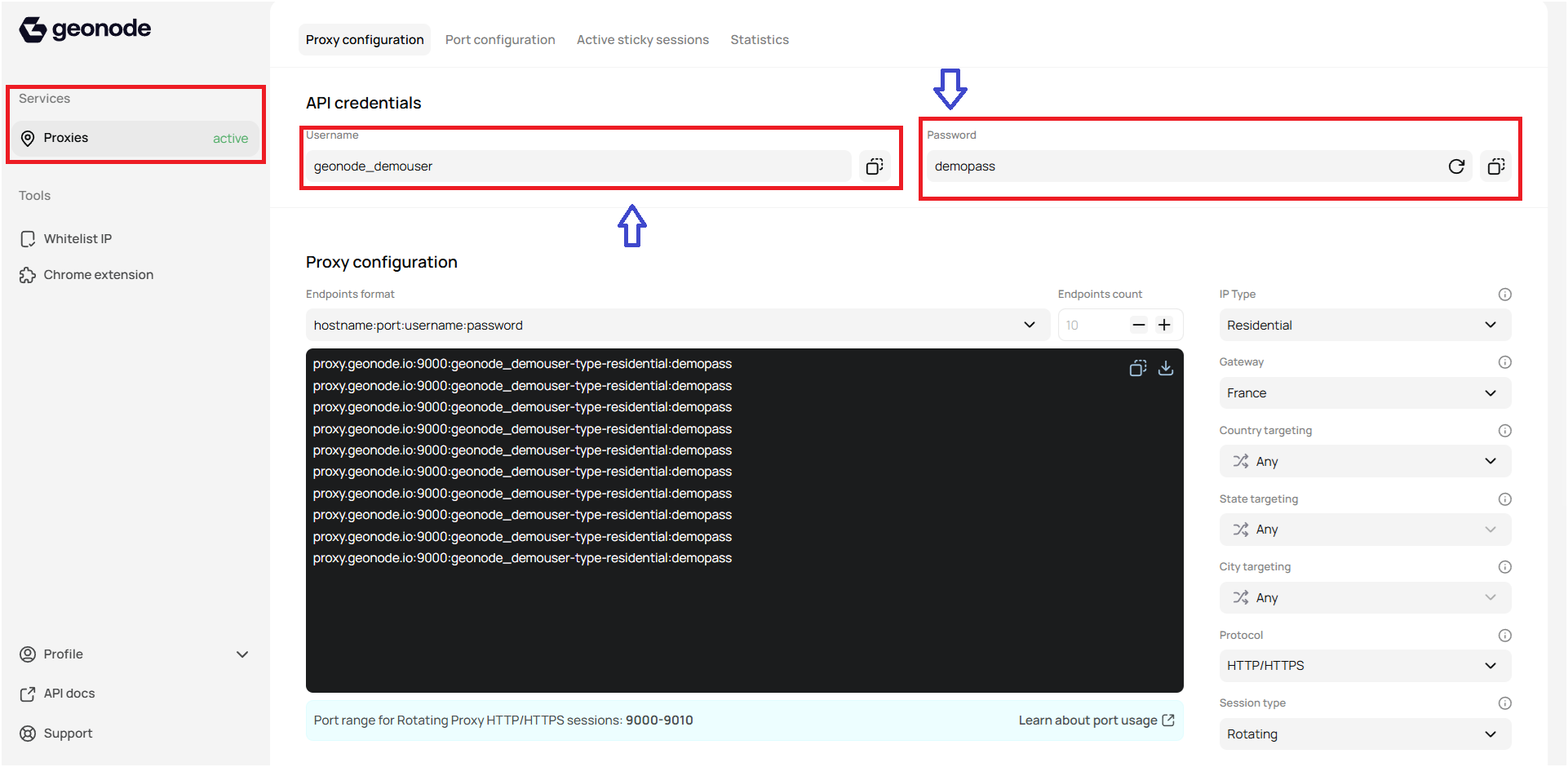
 ### Step 2: Get Proxy Credentials from Geonode
Obtain your essential proxy credentials directly from the dashboard:
* **Username:** Copy your unique API username.
* **Password:** Copy your API password.
### Step 2: Get Proxy Credentials from Geonode
Obtain your essential proxy credentials directly from the dashboard:
* **Username:** Copy your unique API username.
* **Password:** Copy your API password.
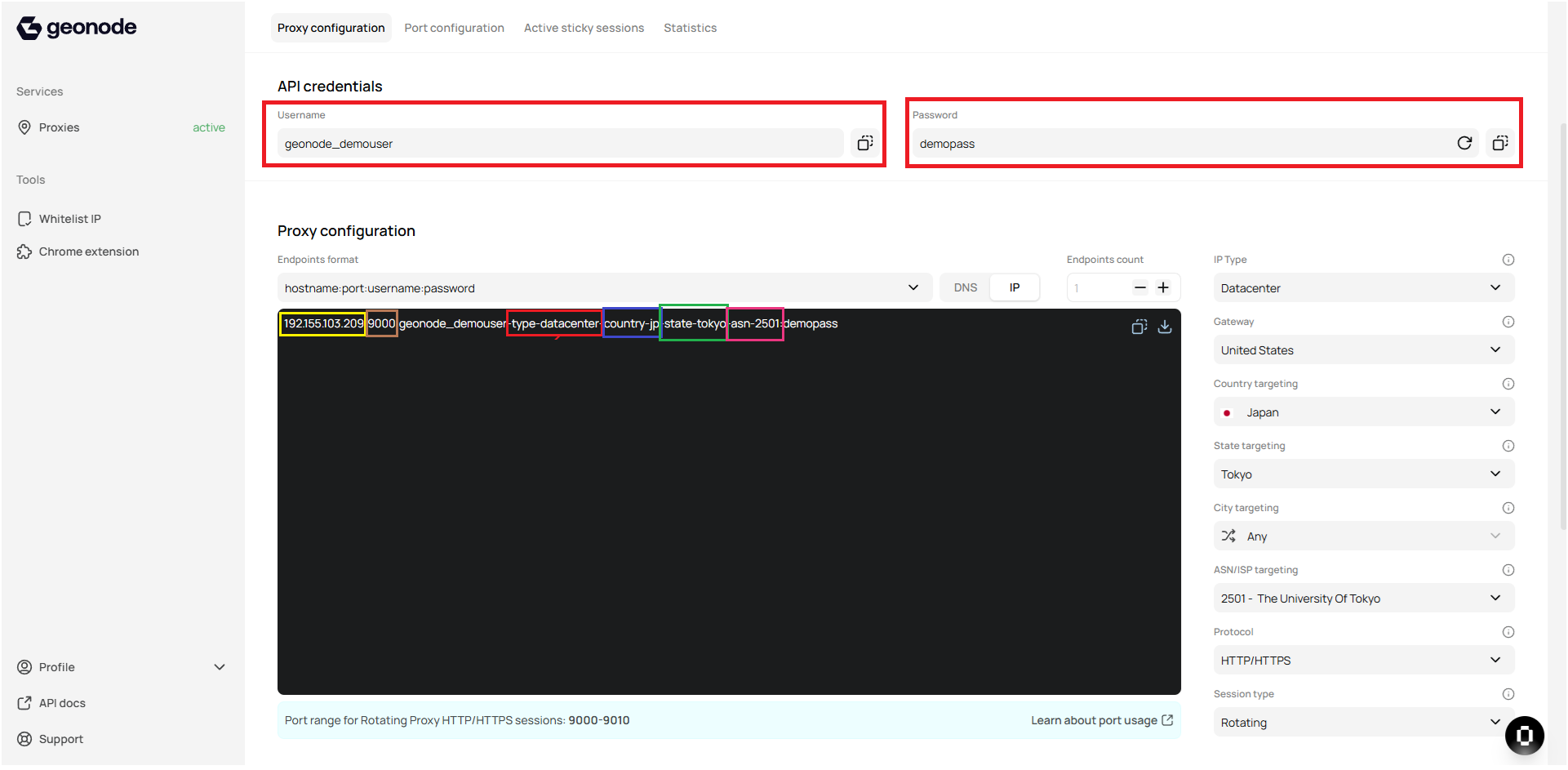
 ### Step 3: Configure Proxy Parameters
Customize your proxy parameters according to your needs within the Proxy Configuration section.
* **Endpoint Format:** `hostname:port:username:password`
* **IP Type:** `-type-datacenter`
* **Gateway:** `192.155.103.209`
* **Geo-Targeting:**
* Country: `-country-jp`
* State: `-state-tokyo` (Note: If state is selected, you cannot select city.)
* ASN/ISP: `-as-2501`
* **Protocol:** HTTP/HTTPS (e.g., port 9000)
* **Session Type**
* **Output Format**
### Step 3: Configure Proxy Parameters
Customize your proxy parameters according to your needs within the Proxy Configuration section.
* **Endpoint Format:** `hostname:port:username:password`
* **IP Type:** `-type-datacenter`
* **Gateway:** `192.155.103.209`
* **Geo-Targeting:**
* Country: `-country-jp`
* State: `-state-tokyo` (Note: If state is selected, you cannot select city.)
* ASN/ISP: `-as-2501`
* **Protocol:** HTTP/HTTPS (e.g., port 9000)
* **Session Type**
* **Output Format**
 ➡️ Follow this guide to understand Proxy Configuration in-depth: [How to use the Endpoint Generator to configure Proxy Parameters](/knowledge-base/proxy-service-guide/geo-targeting)
## API Call
After setting up your endpoint, it's time to make your first API call. Proceed to the API Code Generator section in your dashboard. This tool helps you generate ready-to-use code snippets based on your configured settings.
➡️ Follow this guide to understand Proxy Configuration in-depth: [How to use the Endpoint Generator to configure Proxy Parameters](/knowledge-base/proxy-service-guide/geo-targeting)
## API Call
After setting up your endpoint, it's time to make your first API call. Proceed to the API Code Generator section in your dashboard. This tool helps you generate ready-to-use code snippets based on your configured settings.
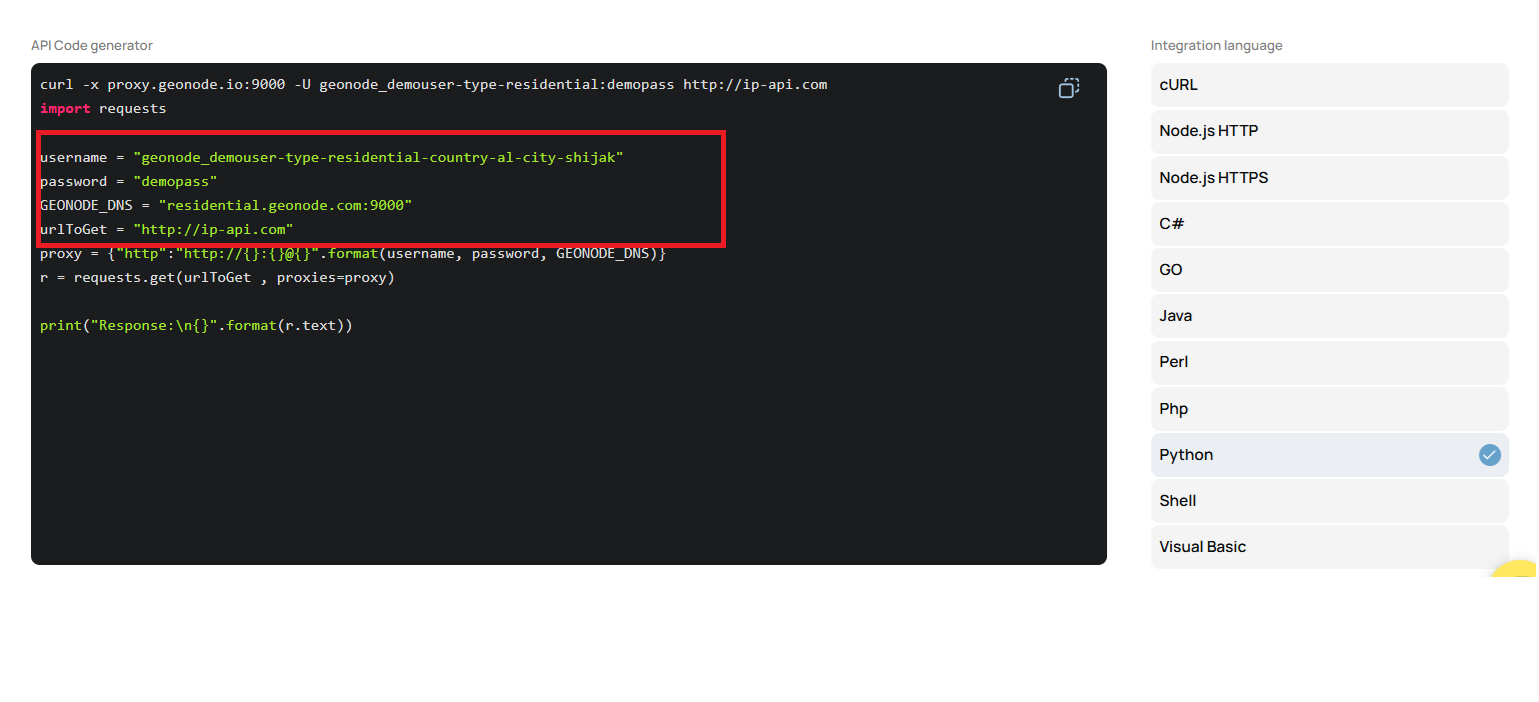 ➡️ Follow this guide to understand the API Code Generator in-depth: [Generate code for API requests](/functionalities/general-proxy-usage/api-code-generator)
## Configure Proxy in Different Browsers, OS, and Extensions
If you're looking to integrate the proxy with different browsers or operating systems, follow the detailed guides below. Each guide provides step-by-step instructions tailored to specific platforms.
### Desktop Operating Systems
* [Windows 10/11](/proxy-setup/desktop-os/windows)
* [macOS](/proxy-setup/desktop-os/macOS)
### Mobile Operating Systems
* [Android](/proxy-setup/mobile-os/android)
* [iOS](/proxy-setup/mobile-os/ios)
### Browsers
* [Chrome](/proxy-setup/browsers/chrome)
* [Edge](/proxy-setup/browsers/edge)
* [Brave](/proxy-setup/browsers/brave)
* [Firefox](/proxy-setup/browsers/firefox)
* [Safari](/proxy-setup/browsers/safari)
* [Incognito Mode](/proxy-setup/browsers/incognito-mode)
* [Incogniton](/proxy-setup/browsers/incogniton)
* [AdsPower](/proxy-setup/browsers/adspower)
* [Ghost Browser](/proxy-setup/browsers/ghost)
* [GoLogin](/proxy-setup/browsers/gologin)
* [Dolphin Anty](/proxy-setup/browsers/dolphin-anty)
* [ClonBrowser](/proxy-setup/browsers/clonbrowser)
* [MoreLogin](/proxy-setup/browsers/morelogin)
* [MultiLogin](/proxy-setup/browsers/multilogin)
### Extensions
* [FoxyProxy](/proxy-setup/extensions/foxyproxy)
* [Geonode Proxy Manager](/proxy-setup/extensions/geonode-proxy-manager)
## Conclusion
Congratulations! You are now equipped to fully leverage your Geonode proxy. Whether you're integrating it within different operating systems, browsers, or directly through API calls, you have all the tools and information necessary to optimize your setup.
***
If you encounter any issues, refer to the [**troubleshooting section**](/knowledge-base/troubleshooting/proxy-not-working) or [**Geonode support**](/additional-resources/support).
***
➡️ Follow this guide to understand the API Code Generator in-depth: [Generate code for API requests](/functionalities/general-proxy-usage/api-code-generator)
## Configure Proxy in Different Browsers, OS, and Extensions
If you're looking to integrate the proxy with different browsers or operating systems, follow the detailed guides below. Each guide provides step-by-step instructions tailored to specific platforms.
### Desktop Operating Systems
* [Windows 10/11](/proxy-setup/desktop-os/windows)
* [macOS](/proxy-setup/desktop-os/macOS)
### Mobile Operating Systems
* [Android](/proxy-setup/mobile-os/android)
* [iOS](/proxy-setup/mobile-os/ios)
### Browsers
* [Chrome](/proxy-setup/browsers/chrome)
* [Edge](/proxy-setup/browsers/edge)
* [Brave](/proxy-setup/browsers/brave)
* [Firefox](/proxy-setup/browsers/firefox)
* [Safari](/proxy-setup/browsers/safari)
* [Incognito Mode](/proxy-setup/browsers/incognito-mode)
* [Incogniton](/proxy-setup/browsers/incogniton)
* [AdsPower](/proxy-setup/browsers/adspower)
* [Ghost Browser](/proxy-setup/browsers/ghost)
* [GoLogin](/proxy-setup/browsers/gologin)
* [Dolphin Anty](/proxy-setup/browsers/dolphin-anty)
* [ClonBrowser](/proxy-setup/browsers/clonbrowser)
* [MoreLogin](/proxy-setup/browsers/morelogin)
* [MultiLogin](/proxy-setup/browsers/multilogin)
### Extensions
* [FoxyProxy](/proxy-setup/extensions/foxyproxy)
* [Geonode Proxy Manager](/proxy-setup/extensions/geonode-proxy-manager)
## Conclusion
Congratulations! You are now equipped to fully leverage your Geonode proxy. Whether you're integrating it within different operating systems, browsers, or directly through API calls, you have all the tools and information necessary to optimize your setup.
***
If you encounter any issues, refer to the [**troubleshooting section**](/knowledge-base/troubleshooting/proxy-not-working) or [**Geonode support**](/additional-resources/support).
***