> ## Documentation Index
> Fetch the complete documentation index at: https://geonode.mintlify.site/llms.txt
> Use this file to discover all available pages before exploring further.
# Payment Methods
> Learn how to add, manage, and update payment methods in Geonode.
***
Geonode allows you to add, update, and manage payment methods for seamless billing and transactions.
***
## **Step 1: Access the Payments Section**
1. Log in to your Geonode account.
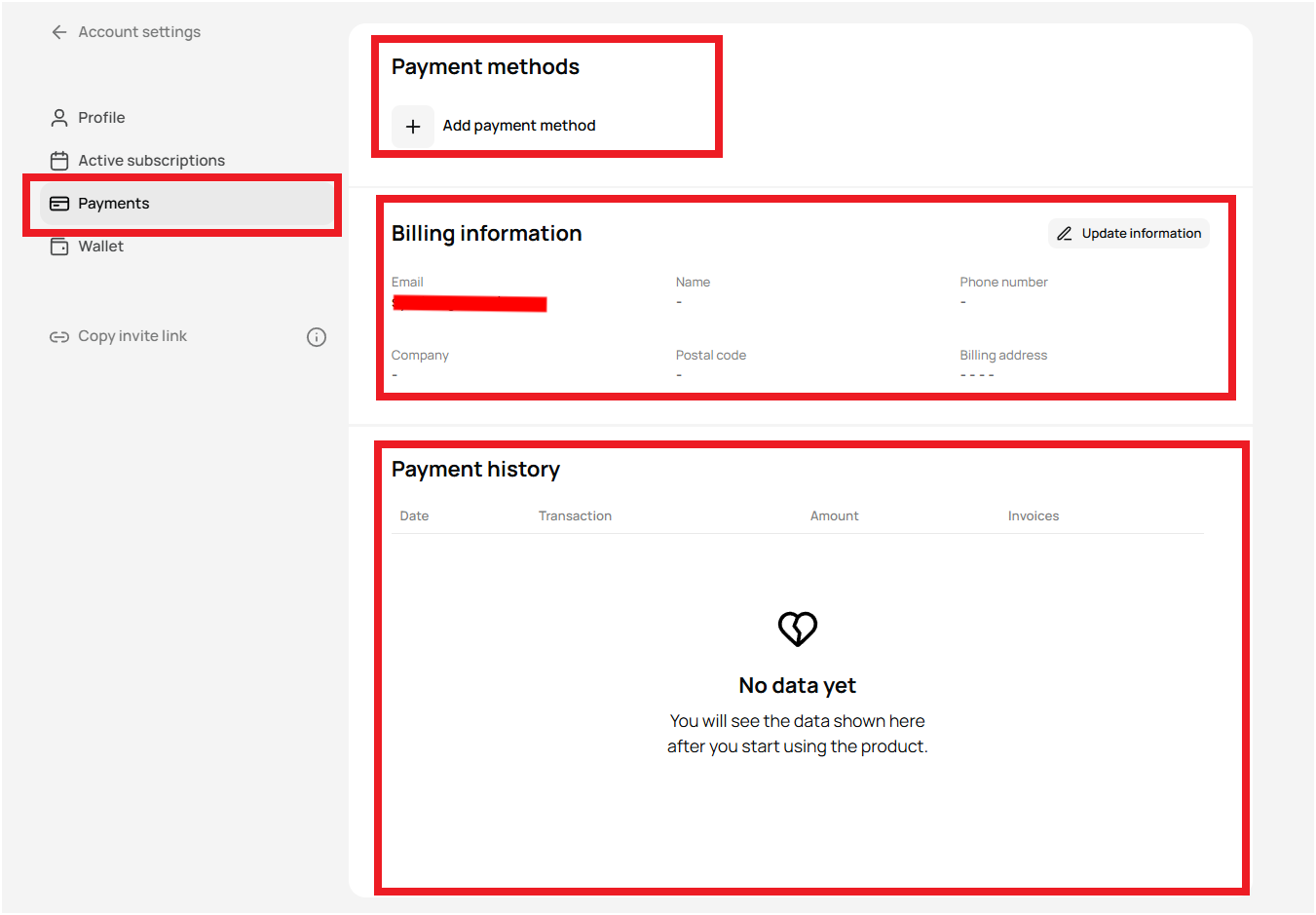
2. Navigate to the Payments section from the left sidebar.
 ***
## **Step 2: Add a New Payment Method**
1. Click on "Add Payment Method."
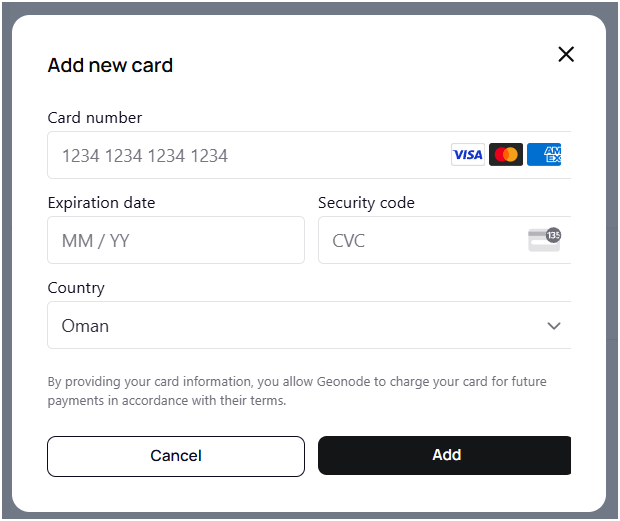
2. A pop-up will appear where you can enter your card details.
### **Required Information**
* Card Number (Visa, Mastercard, or AMEX)
* Expiration Date (MM/YY)
* Security Code (CVC) (3-digit code on the back of your card)
* Billing Country
3. Click "Add" to save the payment method.
***
## **Step 2: Add a New Payment Method**
1. Click on "Add Payment Method."
2. A pop-up will appear where you can enter your card details.
### **Required Information**
* Card Number (Visa, Mastercard, or AMEX)
* Expiration Date (MM/YY)
* Security Code (CVC) (3-digit code on the back of your card)
* Billing Country
3. Click "Add" to save the payment method.
 ***
## **Step 3: Update Billing Information**
1. In the Billing Information section, click "Update Information."
2. Modify details such as:
* Name
* Company (if applicable)
* Billing Address
* Phone Number
3. Click Save Changes to update.
## **Step 4: View Payment History**
1. In the Payment History section, you can track:
* Date of transactions
* Transaction details
* Amount charged
* Invoice records
If you haven't made any payments yet, the section will display "No Data Yet."
***
## **Final Tips**
* Ensure your billing details are up to date to prevent failed payments.
* Use a valid payment method (Visa, Mastercard, AMEX).
* If you encounter payment issues, contact [Geonode Support](https://geonode.com/contact).
***
## **Step 3: Update Billing Information**
1. In the Billing Information section, click "Update Information."
2. Modify details such as:
* Name
* Company (if applicable)
* Billing Address
* Phone Number
3. Click Save Changes to update.
## **Step 4: View Payment History**
1. In the Payment History section, you can track:
* Date of transactions
* Transaction details
* Amount charged
* Invoice records
If you haven't made any payments yet, the section will display "No Data Yet."
***
## **Final Tips**
* Ensure your billing details are up to date to prevent failed payments.
* Use a valid payment method (Visa, Mastercard, AMEX).
* If you encounter payment issues, contact [Geonode Support](https://geonode.com/contact).