> ## Documentation Index
> Fetch the complete documentation index at: https://geonode.mintlify.site/llms.txt
> Use this file to discover all available pages before exploring further.
# Target Specific Location
> How to target specific cities with proxies using the Geonode API
***
This guide will help you understand how to geo-target proxies based on locations like cities, countries, states, and ISPs using the Geonode API..
***
## Prerequisites
Before you begin, ensure that you:
* Have valid Geonode API credentials.
* Have basic knowledge of making API requests (e.g., using cURL or Python).
***
## What is Geo-Targeting?
Geonode's **geo-targeting** capabilities allow you to route requests through proxies located in specific countries, cities, states, or regions. This enables precise location-based proxy management for your needs.
➡️ **Learn more about Geo-Targeting**: [What is Geo-Targeting](/knowledge-base/proxy-service-guide/geo-targeting)
***
## Ways to Target Specific Locations in Geonode
Geonode allows you to target proxies based on:
* **Country**
* **City**
* **State**
* **ISP/ASN**
You can't target both **state** and **city** at the same time.
***
## API Endpoint Structure for Geo-Targeting
Geonode's geo-targeting endpoints are designed to accept location parameters such as city, state, country, or ISP/ASN. Simply append the specific parameter (e.g., `-country-`) after the Geonode username.
```bash theme={null}
curl --request GET \
-x "http://proxy.geonode.io:" \
--user "-country-:" \
--url "http://ip-api.com/json"
```
Replace the placeholder values with your Geonode username, password, and desired location.
***
## Generating User Credentials Based on Location
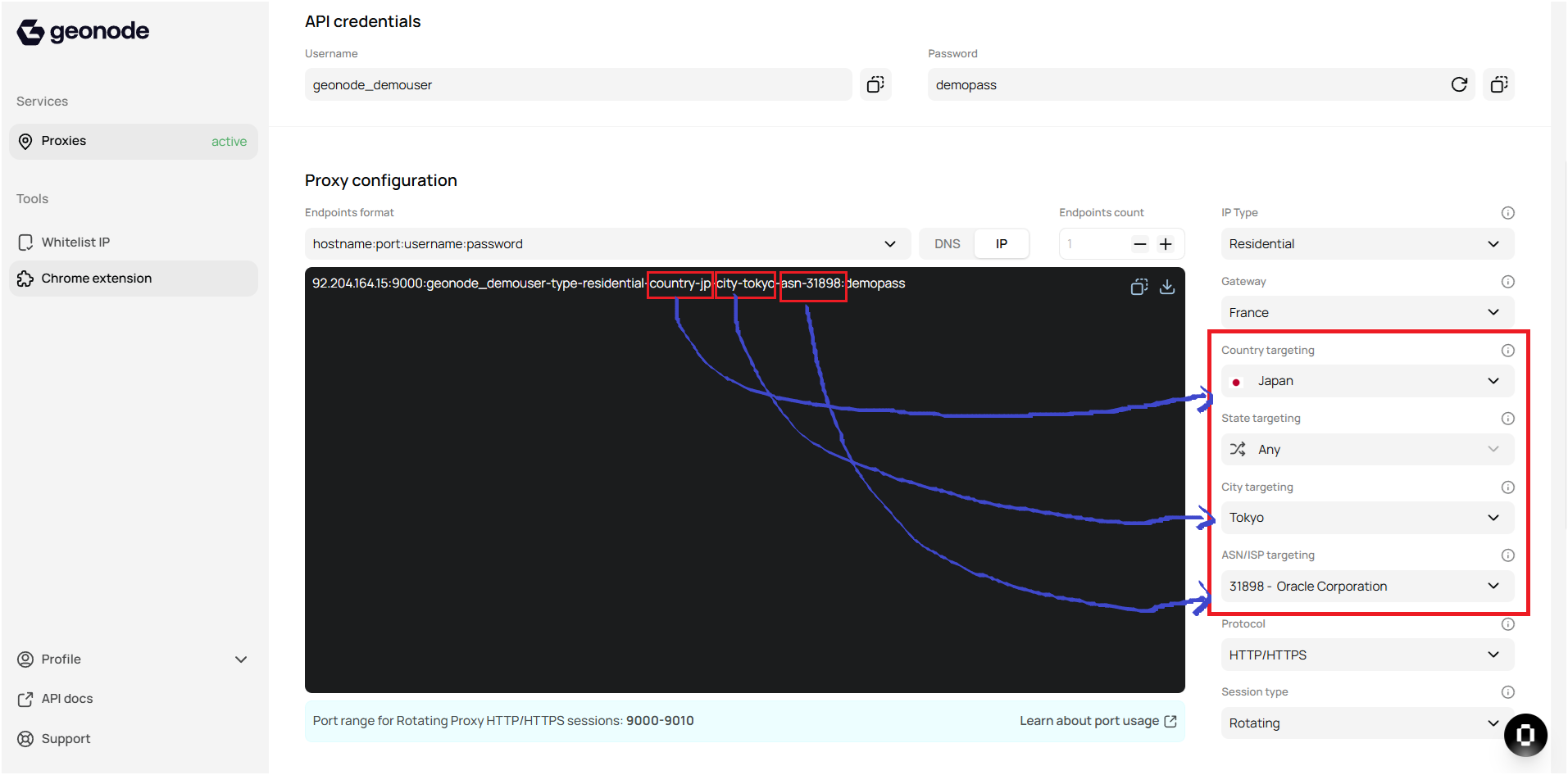
Since the location needs to be included in the username, Geonode makes it easy to generate a location-based proxy username via the Geonode Dashboard:
* Go to the Geonode Dashboard.
* Scroll down to Proxy Configuration.
* On the right, you'll find various location targeting options.
* Once you configure the location, you'll see the updated username, which you can use in API calls for geo-targeted requests.
 ***
## Calling Geo-Targetting API
To target a specific city, state, or country using the Geonode API, use the following endpoint formats:
### Geo-Targeting by Country
To target a proxy by **country**, append `-country-` to the username.
**Example**
```bash theme={null}
curl --request GET \
-x "http://proxy.geonode.io:" \
--user "-country-:" \
--url "http://ip-api.com/json"
```
Check out the detailed API docs here ---> [Perform Country Targeting](/api-reference/geo-targeting/get-country)
***
### Geo-Targeting by State
To target a proxy by **state**, append `-state-` to the username.
**Example**
```bash theme={null}
curl --request GET \
-x "http://proxy.geonode.io:" \
--user "-country--state-:" \
--url "http://ip-api.com/json"
```
Check out the detailed API docs here ---> [Perform State Targeting](/api-reference/geo-targeting/get-state)
***
### Geo-Targeting by City
To target a proxy by **city**, append `-city-` to the username.
**Example**
```bash theme={null}
curl --request GET \
-x "http://proxy.geonode.io:" \
--user "-country--city-:" \
--url "http://ip-api.com/json"
```
Check out the detailed API docs here ---> [Perform City Targeting](/api-reference/geo-targeting/get-city)
***
### Geo-Targeting by ISP/ASN
Geonode also allows you to target proxies based on the **ASN (Autonomous System Number)** of an ISP. To do this, append `-asn-` after specifying the country.
**Example**
```bash theme={null}
curl --request GET \
-x "http://proxy.geonode.io:" \
--user "-country--asn-:" \
--url "http://ip-api.com/json"
```
Check out the detailed API docs here ---> [Perform ISP/ASN Targeting](/api-reference/geo-targeting/get-isp)
***
## API Response
The API will respond with detailed information about the targeted location, including:
* **Region**, **City**, **ISP**, **Latitude**, **Longitude**, and more.
**Example Response:**
```json theme={null}
{
"status": "success",
"city": "New York",
"region": "New York",
"country": "United States",
"latitude": "40.7128",
"longitude": "-74.0060",
"isp": "ISP Example",
"timezone": "America/New_York",
"postal_code": "10001"
}
```
This shows that the request was routed through the proxy located in **New York**, with corresponding geographical details.
***
## Troubleshooting
If you encounter issues when targeting a specific location:
* Double-check that the city, state, or country name is spelled correctly.
* Ensure that the proxy is available and accessible in the targeted location.
* Verify the authentication credentials if you receive errors related to access or authorization.
If you encounter any issues, refer to the [**troubleshooting section**](/knowledge-base/troubleshooting/proxy-not-working) or [**Geonode support**](/additional-resources/support).
***
No, you can't target both state and city at the same time. You must choose one.
You can check the list of available locations directly from the Geonode Dashboard or use the API to retrieve the locations.
Make sure you're using the correct username format for the location and that the proxy is functional in the targeted area. Also, ensure your credentials are correct.
Yes, you can automate this by scripting your requests using loops or functions, specifying different locations for each API call.
***
## Calling Geo-Targetting API
To target a specific city, state, or country using the Geonode API, use the following endpoint formats:
### Geo-Targeting by Country
To target a proxy by **country**, append `-country-` to the username.
**Example**
```bash theme={null}
curl --request GET \
-x "http://proxy.geonode.io:" \
--user "-country-:" \
--url "http://ip-api.com/json"
```
Check out the detailed API docs here ---> [Perform Country Targeting](/api-reference/geo-targeting/get-country)
***
### Geo-Targeting by State
To target a proxy by **state**, append `-state-` to the username.
**Example**
```bash theme={null}
curl --request GET \
-x "http://proxy.geonode.io:" \
--user "-country--state-:" \
--url "http://ip-api.com/json"
```
Check out the detailed API docs here ---> [Perform State Targeting](/api-reference/geo-targeting/get-state)
***
### Geo-Targeting by City
To target a proxy by **city**, append `-city-` to the username.
**Example**
```bash theme={null}
curl --request GET \
-x "http://proxy.geonode.io:" \
--user "-country--city-:" \
--url "http://ip-api.com/json"
```
Check out the detailed API docs here ---> [Perform City Targeting](/api-reference/geo-targeting/get-city)
***
### Geo-Targeting by ISP/ASN
Geonode also allows you to target proxies based on the **ASN (Autonomous System Number)** of an ISP. To do this, append `-asn-` after specifying the country.
**Example**
```bash theme={null}
curl --request GET \
-x "http://proxy.geonode.io:" \
--user "-country--asn-:" \
--url "http://ip-api.com/json"
```
Check out the detailed API docs here ---> [Perform ISP/ASN Targeting](/api-reference/geo-targeting/get-isp)
***
## API Response
The API will respond with detailed information about the targeted location, including:
* **Region**, **City**, **ISP**, **Latitude**, **Longitude**, and more.
**Example Response:**
```json theme={null}
{
"status": "success",
"city": "New York",
"region": "New York",
"country": "United States",
"latitude": "40.7128",
"longitude": "-74.0060",
"isp": "ISP Example",
"timezone": "America/New_York",
"postal_code": "10001"
}
```
This shows that the request was routed through the proxy located in **New York**, with corresponding geographical details.
***
## Troubleshooting
If you encounter issues when targeting a specific location:
* Double-check that the city, state, or country name is spelled correctly.
* Ensure that the proxy is available and accessible in the targeted location.
* Verify the authentication credentials if you receive errors related to access or authorization.
If you encounter any issues, refer to the [**troubleshooting section**](/knowledge-base/troubleshooting/proxy-not-working) or [**Geonode support**](/additional-resources/support).
***
No, you can't target both state and city at the same time. You must choose one.
You can check the list of available locations directly from the Geonode Dashboard or use the API to retrieve the locations.
Make sure you're using the correct username format for the location and that the proxy is functional in the targeted area. Also, ensure your credentials are correct.
Yes, you can automate this by scripting your requests using loops or functions, specifying different locations for each API call.