> ## Documentation Index
> Fetch the complete documentation index at: https://geonode.mintlify.site/llms.txt
> Use this file to discover all available pages before exploring further.
# Exclude Specific Location
> How to exclude cities, states, countries, or ASNs with proxies using the Geonode API
***
This guide will help you understand how to exclude proxies from specific cities, countries, states, or ISPs using the Geonode API.
***
## Prerequisites
Before you begin, make sure you:
* Have active Geonode proxy credentials.
* Understand how to make API calls using tools like cURL or Python.
***
## What is Location Exclusion?
Geonode allows you to exclude certain locations while routing traffic through proxies. This is helpful when you want to avoid specific regions due to content restrictions, compliance, or testing needs.
➡️ Want to route traffic through a location instead? [See Targeting Locations](/functionalities/region-specific-proxies/target-specific-location)
***
## What Can You Exclude?
You can exclude proxies based on:
* Country
* State
* City
* ASN (Autonomous System Number)
You can't combine different exclusion types in a single request. For example, you can't exclude cities and ASNs together.
***
## Format for Exclusion
To exclude a location, modify your proxy username like this:
```bash theme={null}
curl --request GET \
-x "http://proxy.geonode.io:" \
--user "-not.country-:" \
--url "http://ip-api.com/json"
```
Supported location types:
* `not.country`
* `not.city`
* `not.state`
* `not.asn`
You can pass:
* A single exclusion: `-not.city-tokyo`
* Multiple exclusions: `-not.city-tokyo,kyoto,osaka`
***
## Get Proxy with Exclusions from Dashboard
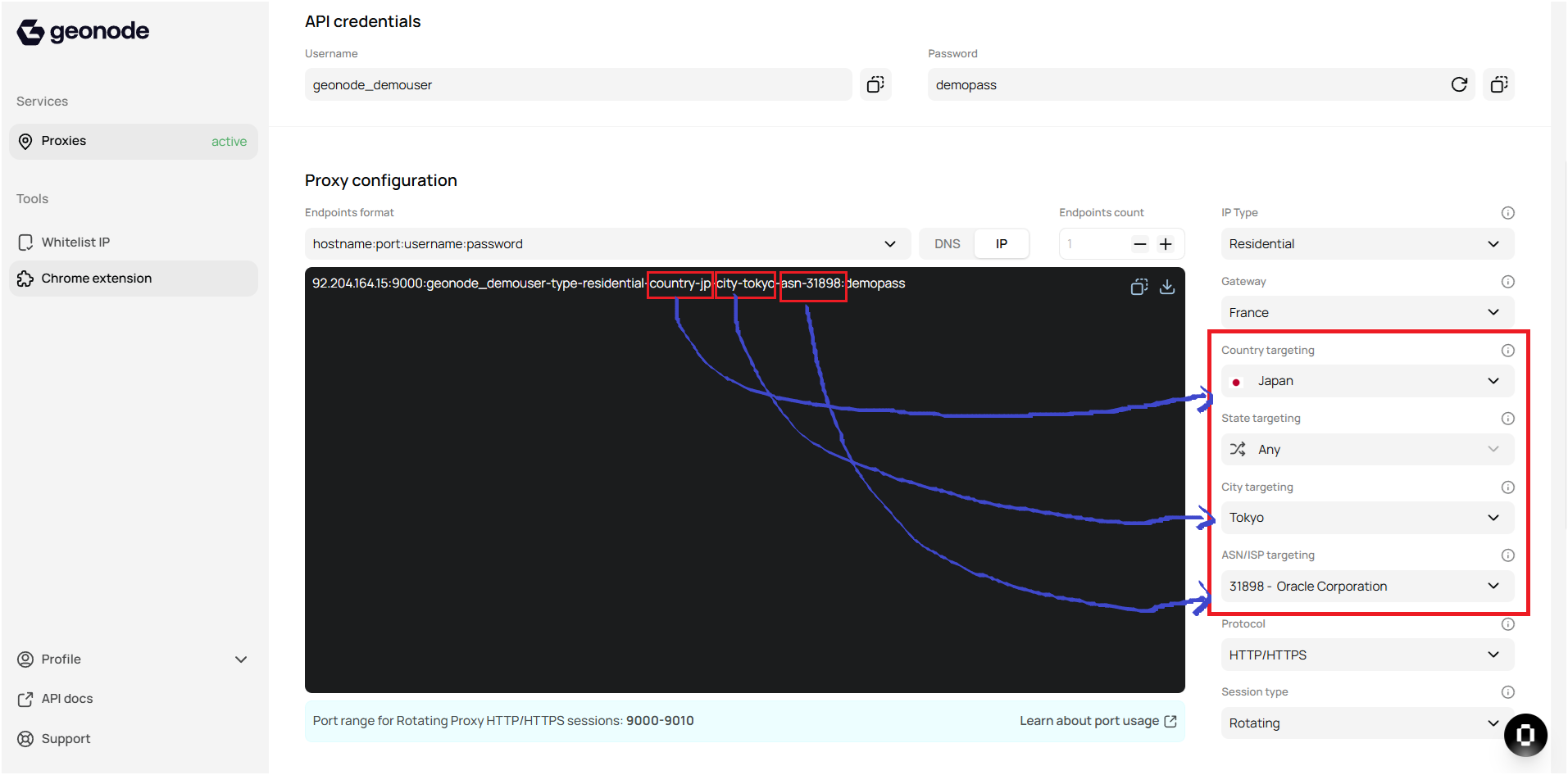
You can easily get the correct country codes, city names, state names, and ASN numbers directly from the Geonode Dashboard.
Just go to the right-hand filters for Country, City, State, or ASN targeting. Once selected, they will appear in the proxy string for reference.
 ***
## Calling API with Location Exclusions
### 1. Exclude by Country
Use `-not.country-xx` or multiple like `-not.country-xx,yy,zz`.
```bash theme={null}
curl --request GET \
-x "http://proxy.geonode.io:" \
--user "-not.country-,:" \
--url "http://ip-api.com/json"
```
📄 [See full API doc for country exclusion](/api-reference/geo-targeting/exclude-country)
***
### 2. Exclude by State
Use `-not.state-`.
```bash theme={null}
curl --request GET \
-x "http://proxy.geonode.io:" \
--user "-country--not.state-:" \
--url "http://ip-api.com/json"
```
📄 [See full API doc for state exclusion](/api-reference/geo-targeting/exclude-state)
***
### 3. Exclude by City
Use `-not.city-`.
```bash theme={null}
curl --request GET \
-x "http://proxy.geonode.io:" \
--user "-country--not.city-:" \
--url "http://ip-api.com/json"
```
📄 [See full API doc for city exclusion](/api-reference/geo-targeting/exclude-city)
***
### 4. Exclude by ASN (ISP)
Use `-not.asn-`. You can also pass multiple values like `-not.asn-31898,12271`.
```bash theme={null}
curl --request GET \
-x "http://proxy.geonode.io:" \
--user "-country--not.asn-:" \
--url "http://ip-api.com/json"
```
📄 [See full API doc for ASN exclusion](/api-reference/geo-targeting/exclude-asn)
***
## Example Response
Here's an example API response when city or ASN is excluded:
```json theme={null}
{
"status": "success",
"country": "United States",
"countryCode": "US",
"region": "NC",
"regionName": "North Carolina",
"city": "Charlotte",
"zip": "28202",
"lat": 35.2327,
"lon": -80.8461,
"timezone": "America/New_York",
"isp": "FiberPower LLC",
"org": "FiberPower LLC",
"as": "AS214483 FiberPower LLC",
"query": "38.13.166.129"
}
```
This shows the API successfully excluded the targeted city, and routed through an allowed location instead.
***
## Troubleshooting Tips
* Make sure exclusions use correct names (e.g., "newyork" not "New York").
* City/state names should not have spaces.
* Double-check that you are not mixing exclusion types in one request.
* If you get `407` errors, check username/password.
If you encounter any issues, refer to the [**troubleshooting section**](/knowledge-base/troubleshooting/proxy-not-working) or [**Geonode support**](/additional-resources/support).
***
No, you can't target both state and city at the same time. You must choose one.
You can check the list of available locations directly from the Geonode Dashboard or use the API to retrieve the locations.
Make sure you're using the correct username format for the location and that the proxy is functional in the targeted area. Also, ensure your credentials are correct.
Yes, you can automate this by scripting your requests using loops or functions, specifying different locations for each API call.
***
## Calling API with Location Exclusions
### 1. Exclude by Country
Use `-not.country-xx` or multiple like `-not.country-xx,yy,zz`.
```bash theme={null}
curl --request GET \
-x "http://proxy.geonode.io:" \
--user "-not.country-,:" \
--url "http://ip-api.com/json"
```
📄 [See full API doc for country exclusion](/api-reference/geo-targeting/exclude-country)
***
### 2. Exclude by State
Use `-not.state-`.
```bash theme={null}
curl --request GET \
-x "http://proxy.geonode.io:" \
--user "-country--not.state-:" \
--url "http://ip-api.com/json"
```
📄 [See full API doc for state exclusion](/api-reference/geo-targeting/exclude-state)
***
### 3. Exclude by City
Use `-not.city-`.
```bash theme={null}
curl --request GET \
-x "http://proxy.geonode.io:" \
--user "-country--not.city-:" \
--url "http://ip-api.com/json"
```
📄 [See full API doc for city exclusion](/api-reference/geo-targeting/exclude-city)
***
### 4. Exclude by ASN (ISP)
Use `-not.asn-`. You can also pass multiple values like `-not.asn-31898,12271`.
```bash theme={null}
curl --request GET \
-x "http://proxy.geonode.io:" \
--user "-country--not.asn-:" \
--url "http://ip-api.com/json"
```
📄 [See full API doc for ASN exclusion](/api-reference/geo-targeting/exclude-asn)
***
## Example Response
Here's an example API response when city or ASN is excluded:
```json theme={null}
{
"status": "success",
"country": "United States",
"countryCode": "US",
"region": "NC",
"regionName": "North Carolina",
"city": "Charlotte",
"zip": "28202",
"lat": 35.2327,
"lon": -80.8461,
"timezone": "America/New_York",
"isp": "FiberPower LLC",
"org": "FiberPower LLC",
"as": "AS214483 FiberPower LLC",
"query": "38.13.166.129"
}
```
This shows the API successfully excluded the targeted city, and routed through an allowed location instead.
***
## Troubleshooting Tips
* Make sure exclusions use correct names (e.g., "newyork" not "New York").
* City/state names should not have spaces.
* Double-check that you are not mixing exclusion types in one request.
* If you get `407` errors, check username/password.
If you encounter any issues, refer to the [**troubleshooting section**](/knowledge-base/troubleshooting/proxy-not-working) or [**Geonode support**](/additional-resources/support).
***
No, you can't target both state and city at the same time. You must choose one.
You can check the list of available locations directly from the Geonode Dashboard or use the API to retrieve the locations.
Make sure you're using the correct username format for the location and that the proxy is functional in the targeted area. Also, ensure your credentials are correct.
Yes, you can automate this by scripting your requests using loops or functions, specifying different locations for each API call.