> ## Documentation Index
> Fetch the complete documentation index at: https://geonode.mintlify.site/llms.txt
> Use this file to discover all available pages before exploring further.
# Rotating Proxies
> How to Use Rotating Proxies with Geonode
***
This guide will walk you through Rotating Proxies of Geonode.
***
## **What are Rotating Proxies?**
Rotating proxies are a powerful feature that allows you to automatically rotate your IP addresses with every request.
➡️ Follow this guide to learn Rotating Proxies in-depth: [What is Rotating Proxies?](/knowledge-base/proxy-service-guide/rotating-proxies)
***
## **Geonode's Rotating Proxies Range**
Geonode provides rotating proxies via HTTP and SOCKS5 protocols, with the following ports:
* HTTP: Ports 9000-9010
* SOCKS5: Ports 11000-11010
Each time you make a request, the system will assign you a new IP address from a different location, making it difficult for websites to track or block your activity.
***
## **How to Use Rotating Proxies with Geonode API**
To use rotating proxies with the Geonode API, follow these steps:
### **1. Configure Your Proxy Settings**
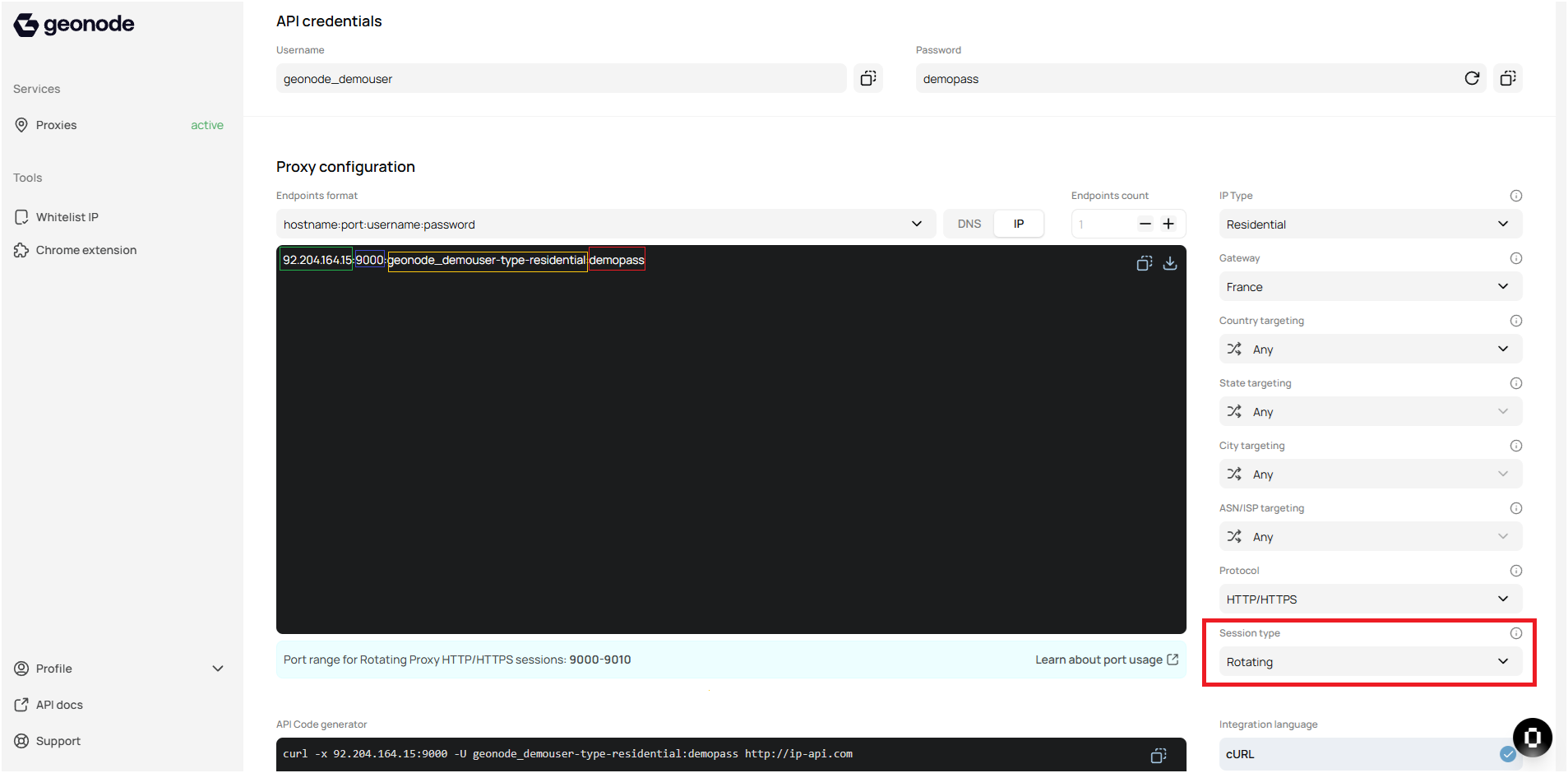
In the Geonode interface, you will first need to configure your proxy settings. Select the desired location, protocol (HTTP/HTTPS or SOCKS5), and session type (Rotating). You can target specific countries, cities, or even ASN/ISP.
Here is an example of how your configuration might look:
* **IP Type**: Residential
* **Gateway**: France (or any location you need)
* **Port Range**: HTTP ports 9000-9010 for rotating IPs
 ### **2. Generate Proxy Endpoints**
Once you've configured your proxy settings, you will be able to generate proxy endpoints. The format of the endpoints typically looks like this:
```
92.204.164.15:9000:geonode_demouser-type-residential:demopass
```
Each endpoint will provide the IP address, port, and credentials (username and password) required for authentication.
### **3. Make API Calls Using Rotating Proxies**
When you want to make API calls using rotating proxies, you simply use the generated proxy endpoints in your API requests. You will be assigned a new IP with every request, depending on your configuration.
Here is a sample code snippet using Python and the `requests` library to make an API request with rotating proxies:
```python theme={null}
import requests
username = "geonode_demouser-type-residential"
password = "demopass"
GEONODE_DNS = "92.204.164.15:9000"
urlToGet = "http://ip-api.com"
proxy = {"http":"http://{}:{}@{}".format(username, password, GEONODE_DNS)}
r = requests.get(urlToGet , proxies=proxy)
print("Response:\n{}".format(r.text))
```
In this example, each request will use a different IP address from the proxy pool.
***
## **Monitor Proxy Usage**
Geonode also provides monitoring tools to track the usage of your proxies. You can check for errors, usage statistics, and ensure that the proxies are working as expected.
➡️ Follow this guide to learn in-depth: [How to Check Proxy Usage](/functionalities/general-proxy-usage/usage-stats-analytics)
***
## **Verify Proxy Connection**
To ensure the proxy is working, check your IP address using an online tool or follow this guide:
* [Verify Proxy Connection](/proxy-setup/verify-proxy-connection)
***
If you encounter any issues, refer to the [**troubleshooting section**](/knowledge-base/troubleshooting/proxy-not-working) or [**Geonode support**](/additional-resources/support).
***
## **FAQs**
Yes, you can add multiple proxies and switch between them by selecting the desired proxy from the list and clicking Connect.
* Helps you maintain anonymity by rotating IP addresses with each request.
* Prevents websites from blocking you based on a single IP address.
* Useful for tasks like web scraping, SEO monitoring, and bypassing geo-restrictions.
* **HTTP Proxies**: Commonly used for browsing and web scraping; they work with HTTP and HTTPS traffic.
* **SOCKS5 Proxies**: More versatile, supporting various protocols like FTP and P2P, making them suitable for a wider range of applications.
Yes, you can configure your rotating proxies to target specific countries, cities, or even ISPs, providing you with regional IPs for content access or geo-specific tasks.
If a rotating proxy gets blocked, Geonode will automatically assign a new IP address from the proxy pool for your next request, ensuring you continue your tasks without disruption.
Yes, rotating proxies are perfect for web scraping as they allow you to make multiple requests without getting blocked by websites, ensuring your scraping activities remain seamless.
You can track your rotating proxy usage and monitor performance through the Geonode Dashboard, where you can see statistics such as successful requests and errors.
Yes, rotating proxies provide better anonymity and bypass blocks more effectively since each request uses a different IP address. Static proxies can be easily detected and blocked, whereas rotating proxies make it harder for websites to track and block you.
### **2. Generate Proxy Endpoints**
Once you've configured your proxy settings, you will be able to generate proxy endpoints. The format of the endpoints typically looks like this:
```
92.204.164.15:9000:geonode_demouser-type-residential:demopass
```
Each endpoint will provide the IP address, port, and credentials (username and password) required for authentication.
### **3. Make API Calls Using Rotating Proxies**
When you want to make API calls using rotating proxies, you simply use the generated proxy endpoints in your API requests. You will be assigned a new IP with every request, depending on your configuration.
Here is a sample code snippet using Python and the `requests` library to make an API request with rotating proxies:
```python theme={null}
import requests
username = "geonode_demouser-type-residential"
password = "demopass"
GEONODE_DNS = "92.204.164.15:9000"
urlToGet = "http://ip-api.com"
proxy = {"http":"http://{}:{}@{}".format(username, password, GEONODE_DNS)}
r = requests.get(urlToGet , proxies=proxy)
print("Response:\n{}".format(r.text))
```
In this example, each request will use a different IP address from the proxy pool.
***
## **Monitor Proxy Usage**
Geonode also provides monitoring tools to track the usage of your proxies. You can check for errors, usage statistics, and ensure that the proxies are working as expected.
➡️ Follow this guide to learn in-depth: [How to Check Proxy Usage](/functionalities/general-proxy-usage/usage-stats-analytics)
***
## **Verify Proxy Connection**
To ensure the proxy is working, check your IP address using an online tool or follow this guide:
* [Verify Proxy Connection](/proxy-setup/verify-proxy-connection)
***
If you encounter any issues, refer to the [**troubleshooting section**](/knowledge-base/troubleshooting/proxy-not-working) or [**Geonode support**](/additional-resources/support).
***
## **FAQs**
Yes, you can add multiple proxies and switch between them by selecting the desired proxy from the list and clicking Connect.
* Helps you maintain anonymity by rotating IP addresses with each request.
* Prevents websites from blocking you based on a single IP address.
* Useful for tasks like web scraping, SEO monitoring, and bypassing geo-restrictions.
* **HTTP Proxies**: Commonly used for browsing and web scraping; they work with HTTP and HTTPS traffic.
* **SOCKS5 Proxies**: More versatile, supporting various protocols like FTP and P2P, making them suitable for a wider range of applications.
Yes, you can configure your rotating proxies to target specific countries, cities, or even ISPs, providing you with regional IPs for content access or geo-specific tasks.
If a rotating proxy gets blocked, Geonode will automatically assign a new IP address from the proxy pool for your next request, ensuring you continue your tasks without disruption.
Yes, rotating proxies are perfect for web scraping as they allow you to make multiple requests without getting blocked by websites, ensuring your scraping activities remain seamless.
You can track your rotating proxy usage and monitor performance through the Geonode Dashboard, where you can see statistics such as successful requests and errors.
Yes, rotating proxies provide better anonymity and bypass blocks more effectively since each request uses a different IP address. Static proxies can be easily detected and blocked, whereas rotating proxies make it harder for websites to track and block you.